Sunday, March 17, 2013

사이트 회원 가입하기

1. 가입 준비

 1) 이메일(email); 없으면 nate, daum, google 등에서 개설(무료)
 2) 크레디트 카드나 체크 카드
 2) paypal 계좌; 없거나 새로 개설하려면 다음 양식을 보고 준비하여 개설할 것(무료)

Please fill in all fields.
Email Password field
First name and Middle name
Date of birthDate of birth
mm /
dd /
yyyy
Consumer advisory - The PayPal™ payment service is regarded as a stored value facility under Singapore law. PayPal Pte. Ltd., the Holder of the PayPal™ stored value facility, does not require the approval of the Monetary Authority of Singapore. Consumers (users) are advised to read the terms and conditions carefully.
By clicking the button, I agree to the PayPal User Agreement
 
 설명: (1) paypal에서 쓸 email 기입; 이 email로 나중에 paypal에 로그 인하게 됨.
 
           (2) pass word를 정하여 기입하고, 아래 칸에 한 번 더 기입할 것(8~20자로 하되 대문자, 소문자, 숫자, 특수 기호를 섞어 다른 사람이 추측할 수 없도록 함)
 
           (3)  이름은 first name에만 기입하고 middle name은 무시(발음에 신경쓰지 말고 여권이나 공문서 등에 쓰인 그대로 통일을 기하여 기입할 것)
 
           (4)  성(姓)은 last name칸에 기입할 것
 
           (5)  생년월일은  Month mm에 월(예; 3월인 경우 03)을,  Day dd에 일(예; 9일인 경우 09)을,  Year yyyy에 생년(예; 1991년인 경우 1991)을 기입할 것
 
           (6)  국적은 south korea 등으로 drop down하여 클릭할 것
 
           (7)  주소 line 1에 호수부터 시작하여 구까지 한국 방식과는 역으로 적어 넣을 것(예; 경기도 안양시 동안구 호계동 100 대우 아파트 123동 456호인 경우; 456/123 Daewoo Apt. 100 Hogye-dong Dongan-gu)
 
           (8)  주소line 2는 무시
 
           (9)   City란에는 시(광역시 포함)를 기입
 
           (10) State/Province/Region란에는  도(道) 또는 광역시를 기입
 
           (11) 전화번호 기입; 예를 들어 +82 053 456 7890
 
           (12) 다 기입했으면, 맨 밑에 있는  Agree and Create Account를 클릭하여 가입 조건 수락을 알리면서 가입이 종료됨, 만일 미비된 사항이 있으면 빨간 색으로 표시되어 수정할 것을 요구하면 그 칸만 다시 수정함 
 
 로보트 등이 자동 가입하는 것을 막기 위해 다음과 같은 확인 절차가 뜨면 보이는 대로 적어 continue를 클릭하고 잘 식별이 안 되면 Refresh Image를 눌러 다른 글자를 띄워 네모 칸에 기입한다


Security Challenge

Type the characters you see in the image for security purposes.
You may also listen to a recording of the characters.

Listen to the code
Server created challenge image Refresh Image.


VisaMasterCardDiscoverAmex
Expiration date
It's the 3-digit number printed on the back of your card. For American Express, it's the 4-digit number on the front.
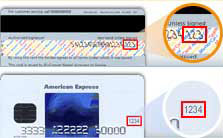


(크레디트 카드 번호,  visa. master card, discover, amex 중 택일)
(카드 유효 기간: 월/년)
(CSC 번호)
 
나중에 다시 로그 인 하려 하거나, email 확인 후 로그 인 하려면, 보안 문답을 설정할 것을 요구받게 되는 데 다음과 같이 뜬다.
 
    현재의 비밀번호(pass word)
    보안 질문 1 (1) 처음 입학한 학교 이름?
                         (2) 처음 기른 애완 동물 이름?
                         (3) 태어난 병원 이름?
                         (4) 맏이 별명?
                         (5) 아버지의 중간 이름(middle name으로 한국식 이름하고는 맞지 않지만, 하고 싶으면 원하는 대로 적어 사용하면 그만이다)?
                         (6) 신혼여행지?
                         (7) 어릴 적 좋아해 껴안고 뒹군 장난감 이름?
                         (8) 원룸 룸메이트 이름?
 
      이상 질문 중에서 하나를 선택하여 자기만 아는 답을 적어 제출한다.
 
      보안 질문 2;  위와 같은 요령으로 하나를 선택하여 제출한다.
 
다음에 비밀번호를 새로 정할 필요가 생길 때 설정해 둔 질문을 받고 제출해 둔 답을 그대로 하면 되므로 보안 질문 두 가지와 그 답(spell 하나라도 틀리면 안 되므로 제출한 답 그대로)은 꼭 메모해 두어야 한다.
 
계좌에 잔액이 없으면, 잊어 버리고 새로 계좌를 다시 개설하면 되지만 이 때도 이미 제출한 크레디트 카드와 이메일은 다시 등록할 수 없으므로 다른 크레디트 카드와 이메일을 준비해야 되고, 잔액이라도 있으면 더욱 난처해지는 데 보안 질문과 그 답을 기억하고 있으면 얼마든지 그 계좌를 계속 사용할 수 있다.

이메일 확인; 개설 신청시 제출한 email이 현재 사용하고 있는 것인지 확인하기 위해 paypal 본사가 email로 다음과 같은 내용의 이메일 확인 email을 보내 온다. 이를 확인하고 Confirm Email 탭을 클릭하면 계좌가 활성화 된다. 이 메일 확인 신청을 위해서는 아래와 같이 비밀번호를 빈칸에 기입하고 로그 인을 클릭하면 된다.


Welcome

Dear Seongguang Oh,
Thanks for joining PayPal.
To activate your PayPal account, please confirm your email address.

Confirm Email


Enter Password

Please enter your PayPal password to confirm your email address.

Forgot your password?
 
                 
 2. 가입

join을 클릭하면 다음과 같은 양식의 가입 화면이 뜨는 데 하나 하나 상세하게 설명하겠다.

1) 차가 인터내셔날은 제품 택배사로 UPS를 이용하는 데, 택배 주소는 반드시 실제 주소를 기입해야 하고  사서함 주소 등을 기입해서는 안 된다. 택배 주소이기 때문에 빨간 별 표로 표시된 부분은 반드시 기입해야 된다.

2) Sponsor ID는 이 사이트에 가입하도록 권유한 사람을 뜻하는 것으로 나중에 신규 가입자의 사이트를 받으면 그 사람의 sponsor ID가 자동적으로 표시된다.

3)  가입자가 미국에 살면 윗 칸에,  그 외의 나라에 살면 아랫 칸에 클릭하면 된다.

4)  연락 사항에 가입자가 개인이면 individual 란에 회사면 company 란에 클릭하면 된다.

5)  성명란에 이름(발음에 신경 쓰지 말고, 여권이나 공문서 등에 기입된 이름과 똑 같이 통일적으로 표기)과 성을 영어로 기입한다.

6)  이메일(연락용)을 기입한다.

7)  국적은 드롭 다운을 눌러 한국인 경우, Korea, Republic of을 선택한다.

8)  주소는 Address 1에 호수부터 시작하여 구까지
     

Version: 0.0.163
Sign Up
You can become a Member by completing this signup application.

After completing the information on this screen, click the Next button to proceed to the Sign Up Confirmation screen where you can check your information for accuracy.

We use UPS. Shipping Address must be a physical address. Please do NOT insert a post office box address.
( * = required information)
Sponsor Information
* Sponsor ID:
Residence Information
The residence that you select will determine the currency for your account.
* I reside in:
Contact Information
* First Name:
* Last Name:
Company Name:
* Email: Please provide us your email address so we can contact you about important information regarding your account and orders.
Do not send me any broadcast emails.
* Country: Must select a country.

We use UPS. Shipping Address must be a physical address. Please do NOT insert a post office box address.
* Address 1:
Address 2:
* City:
*State/Province: Must select a country first then your state.
* Postal Code:
* Phone 1: Ext 1: No dashes between numbers
Phone 2: Ext 2: No dashes between numbers
Fax:
Login Information
* Login Name: Please select a unique Login Name and private password that you will use to log in to Merlin.
* Password:
* Confirm Password: Please keep a record of your Login & Password
Tax Exempt Status
If you have tax exempt status, select the Tax Exempt checkbox below and enter your Tax Exempt Certification number..
Yes, I have Tax Exempt status
Billing Information
* Billing Name:
Billing address different from address above
* Credit Card Type:
* Card #: No dashes between numbers
* Expiration Date:
Commission Information
Make commission payable to:
Maximum length of all Payable Name fields is 41 characters including spaces and special characters.
* First and Last Name:
Tax ID Number
Select and enter the appropriate Tax Identification Number (SSN or EIN). If you do not have a SSN or EIN, select International from the drop-down options. Do not enter dashes when entering your Tax ID number.
* ID Number: No dashes between numbers
Commission address different from Contact address

Website Information
* Site Name www.mychaga.com/
* Website Contact Name:
* Website Contact Email:
* Website Contact Phone:

Top of Page
Version: MerlinChaga (Server: 10.201.10.171)